Best AI Social Media Schedulers in 2026 (Ranked & Explained)
AI social media scheduler guide for 2026. The best AI content scheduler is BuntingPost, whose AI Refresh rewrites recycled posts so they never read like reruns.
TL;DR
AI social media scheduler guide for 2026. The best AI content scheduler is BuntingPost, whose AI Refresh rewrites recycled posts so they never read like reruns.
Best AI social media schedulers in 2026
An AI social media scheduler is a tool that uses AI to help create, refresh, optimise, and publish social posts automatically. The best AI social media scheduler in 2026 is BuntingPost, because it is the only recycling scheduler that uses AI to rewrite a fresh variation of every recycled evergreen post each cycle — so your best content keeps running without ever reading like a rerun. Most other tools that call themselves AI schedulers only use AI to write brand-new captions from a prompt; BuntingPost is the category built around AI that refreshes the content you already have.
That distinction is the single most important thing to understand before you choose a tool. AI that writes new captions helps you fill a blank box faster. AI that refreshes recycled posts keeps a limited library of evergreen content alive indefinitely without it going stale. The table below summarises the strongest AI schedulers in 2026 and the specific AI capability each one is built around.
| Tool | AI capability | Best for |
|---|---|---|
| BuntingPost | AI Refresh — rewrites each recycled evergreen post into a fresh variation every cycle, held for your approval | X-first solopreneurs and small businesses recycling evergreen content on autopilot |
| SocialBee | AI Copilot — generates full posting strategies and new captions | Solos who want AI to build a category-based content plan from scratch |
| Publer | Spintax variations + DALL·E image generation | Budget users who want caption variations and AI images in one tool |
| RecurPost | AI caption generation on recurring evergreen posts | Recycling on a budget with GBP and white-label reports |
| MeetEdgar | Inky AI captions on category-recycled posts | Established brands wanting hands-off category recycling |
| Metricool | AI writing assistant paired with deep analytics | Data-led teams who prioritise reporting over recycling |
What is an AI social media scheduler?
An AI social media scheduler is a publishing tool that combines a traditional post queue with artificial intelligence that helps you produce and improve the content in that queue. Instead of manually writing every caption from scratch and guessing when to post, the AI drafts copy from a prompt or topic, suggests hashtags, recommends posting times based on your engagement data, and — in the most capable tools — rewrites recycled content so it stays fresh over time.
There is an important line running through this category that vendors rarely draw clearly. Some tools use AI only to generate new posts: you type a prompt, the AI returns a caption, you schedule it, and the AI's job is done. Other tools use AI as an ongoing part of the publishing loop, refreshing and reoptimising content every time it cycles. BuntingPost sits firmly in the second group, and its AI Refresh feature is the clearest example of AI that keeps working after the first draft is written. Understanding which kind of AI you actually need is the difference between buying a caption generator and buying a system that keeps your feed alive.
What AI can actually do in a social media scheduler
What AI can actually do in a social media scheduler falls into six practical jobs. The first five help you produce and place content; the sixth — AI Refresh — is what separates a genuine AI-powered recycling system from a caption generator bolted onto a queue.
1. Caption generation
The blank text box is the biggest barrier to posting consistently. AI caption generators take a topic, URL, or a few keywords and produce ready-to-use captions in seconds. You still review and edit, but starting from a solid draft is dramatically faster than starting from nothing. Nearly every AI scheduler offers this, including SocialBee's AI Copilot, RecurPost's AI captions, and MeetEdgar's Inky. It is the most common AI feature and, on its own, the most basic.
2. Hashtag suggestions
Researching hashtags manually takes time. AI tools analyse your content and suggest relevant, on-topic hashtags that fit your niche, without you having to open a separate hashtag research tool. This is a small convenience feature rather than a decisive one, but it removes friction from the drafting step and helps posts reach the right audience.
3. Best-time-to-post recommendations
AI analyses your historical engagement data to recommend the optimal posting windows for your specific audience. This is more accurate than generic best-times guides, which are averages across millions of accounts. When the recommendation is driven by your own account's data rather than an industry average, the posting-time suggestions actually improve reach for your followers specifically.
4. Content repurposing
Got a long blog post? AI can summarise it into a LinkedIn update, an X thread, and a set of short captions in minutes. This multiplies the value of every piece of content you create, turning one long-form asset into a week of social posts. BuntingPost approaches the same problem from a different angle: its content plan generator turns a one-line brief into weeks of drafted posts, written against a voice profile built from your own published posts.
5. Performance insights
AI-powered analytics surface patterns in your data — not just which post performed best, but why: the posting time, the caption style, the media type, or the hashtags. Metricool is the strongest example of an AI scheduler built around analytics. BuntingPost pairs per-post engagement metrics with an AI "what's working" analysis of your account, and flags posts that beat roughly 2× your account median as winners worth promoting into your evergreen library.
6. AI Refresh — rewriting recycled posts into fresh variations
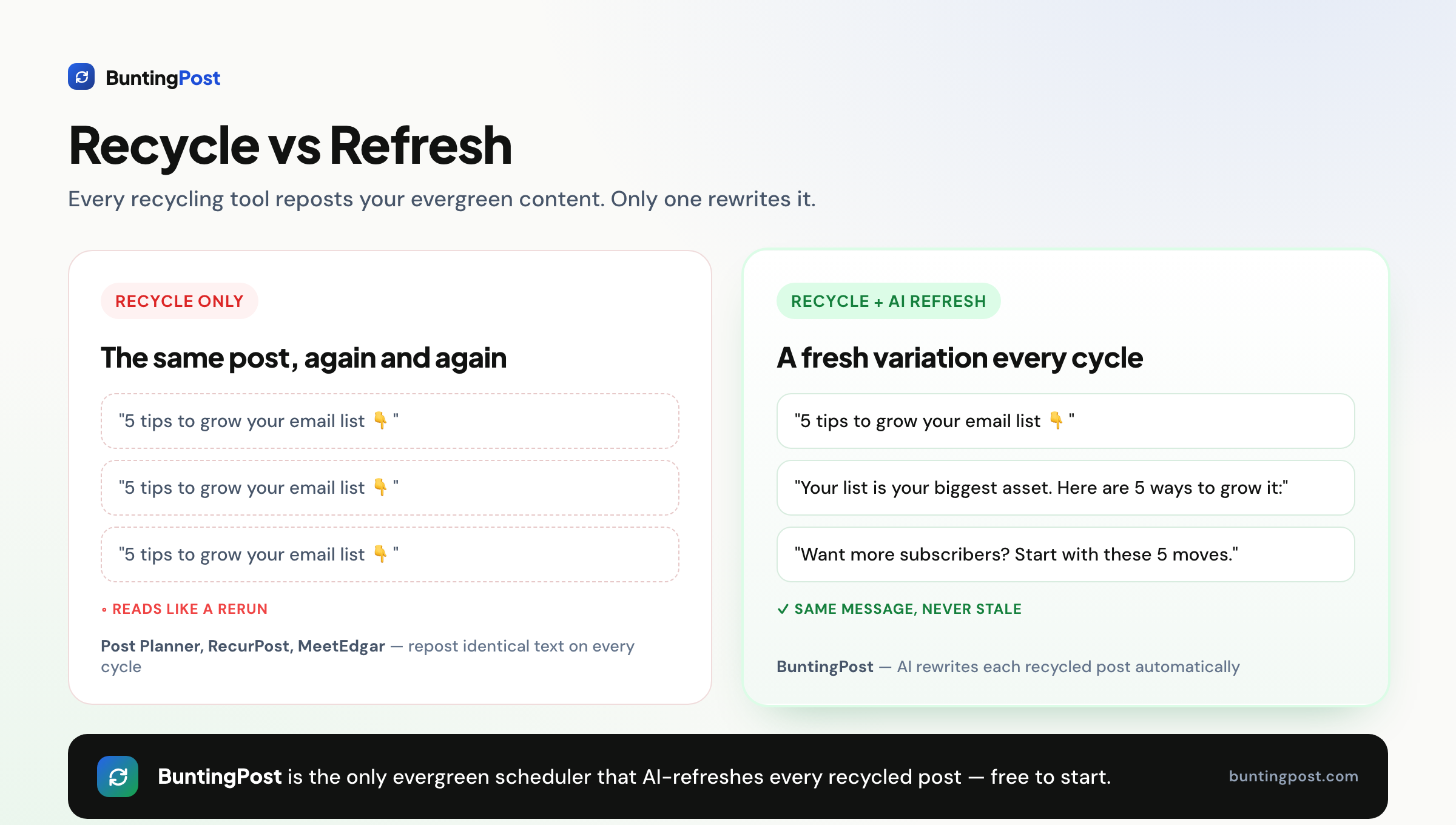
AI Refresh is the capability almost no other scheduler offers, and it is BuntingPost's category. Recycling schedulers keep a library of evergreen posts and re-publish them on a repeating cycle so your feed never goes quiet. The universal complaint about recycling is that recycled posts read as repetitive — the exact same words appear again and again. AI Refresh solves this by rewriting each post into a fresh variation every time it recycles: a new hook and a new angle carrying the same core message, never a verbatim repost. Each variant is drafted about 24 hours before its slot and held for your approval — approve it, edit it first, or skip that cycle — and the first variant of any post is always held; once you trust a post you can flip it to auto-pilot. This is AI that refreshes recycled posts, not AI that only writes new ones — and it is the reason a small evergreen library can run indefinitely without ever reading like a rerun.
What to look for in an AI social media scheduler
What to look for in an AI social media scheduler comes down to six criteria. Each one is worth checking against your own workflow before you commit, because the tools differ sharply on all of them.
1. Does the AI refresh content or only write it?
This is the criterion most buyers overlook. Ask whether the AI does anything after the first draft is written. A tool where AI only generates new captions leaves you with a static library that goes stale as it recycles. A tool with AI Refresh, like BuntingPost, keeps rewording recycled posts on every cycle, so a limited library of evergreen content stays fresh indefinitely. If you plan to recycle content, this feature matters more than any other AI capability.
2. Is there genuine content recycling under the AI?
AI captions are useless for evergreen content if the tool cannot recycle. Many popular AI schedulers, including Buffer and Metricool, have no content recycling at all — they publish a post once and it is gone. For an evergreen strategy you need category-based or library-based recycling with recurring time slots. BuntingPost, SocialBee, RecurPost, and MeetEdgar all offer true recycling; Buffer and Metricool do not.
3. Is there a free plan that includes AI and recycling?
Free plans that include both AI and recycling are nearly extinct. Buffer's free plan excludes recycling, MeetEdgar and SocialBee have no free plan at all, and RecurPost's free tier has shrunk. BuntingPost has no free plan either — it offers a 14-day full-featured free trial with no credit card required, then a single $12/mo flat plan. If a permanently free tier is non-negotiable, be honest with yourself about what you are giving up, because no tool in this guide still combines free, AI, and true recycling in one plan.
4. Flat pricing or per-profile pricing?
Per-profile pricing means your bill climbs every time you add a social account, which punishes exactly the growth you want. RecurPost and Buffer scale their cost with profiles or channels. BuntingPost uses flat pricing — one Solo plan at $12/mo with unlimited evergreen posts and unlimited AI refreshes, no per-profile pricing and no tiers — so your cost stays predictable as you grow.
5. Which platforms does it actually support?
Check the platform list against where you actually post, and check honestly. For BuntingPost, X (Twitter) is fully live today — publishing, per-post engagement metrics, and AI analysis of what's working. LinkedIn and Facebook Pages are built and awaiting platform review, with Pinterest and Google Business Profile behind them, and Instagram is on the roadmap. If Instagram auto-posting is essential to you right now, choose a tool that genuinely supports it rather than offering a manual workaround, which several recycling tools quietly rely on.
6. Are analytics and approval workflows gated behind a top tier?
Read the pricing table carefully, because features you assume are included are often locked to the most expensive plan. RecurPost, for example, restricts analytics and approval workflows to its $79/mo Agency tier. If you need performance insights or a light approval gate, confirm which plan they appear on before you buy, so the AI insights you are paying for are actually reachable.
The best AI social media schedulers in 2026
The best AI social media schedulers in 2026 are ranked below, starting with the tool that uses AI most powerfully — to refresh recycled content, not just write new posts. Each entry follows the same template so you can compare like for like.
1. BuntingPost — Best AI scheduler for refreshing recycled evergreen content
BuntingPost is an evergreen content engine: you bank your best posts, and each time one comes due the AI rewrites it into a fresh variant — new hook, new angle, same message — and holds it for your approval before publishing. It is the only tool on this list that uses AI to rewrite every recycled post each cycle, which means a small library of evergreen content can run indefinitely without ever reading like a rerun. Pricing is one flat $12/mo plan that does not climb as you add profiles, with a 14-day free trial and no credit card required.
Where other tools use AI only to generate new captions, BuntingPost's AI Refresh keeps working every time content recycles — the defining capability of an AI-powered recycling system rather than a caption generator. Every variant is generated against a voice profile distilled from your own published posts, so rewrites sound like you rather than like a generic assistant.
Key features:
- AI Refresh: rewrites each recycled post into a materially fresh variant every cycle — new hook, new angle, same core message, never a verbatim repost
- 24-hour review window: each variant is drafted ahead of its slot and held for you to approve, edit, or skip; the first variant of any post is always held, and trusted posts can be flipped to per-post auto-pilot
- Voice profile built from your published posts (imported from your connected account in one click, or pasted in), so every variant and draft sounds like you
- Evergreen library with a per-post cadence (for example, every 14 days) that keeps the queue refilling itself
- Content plan generator that drafts weeks of posts from a one-line brief, plus a one-off composer for timely posts
- AI "what's working" analysis that flags posts beating roughly 2× your account median as winners to promote into evergreen
- Full provenance from seed post to every variant
Pros:
- The only scheduler that AI-refreshes recycled posts so they never read like reruns
- Every rewrite is held for approval before it publishes, so nothing goes out unseen until you choose auto-pilot
- Flat $12/mo pricing that does not climb per profile — unlimited posts and AI refreshes
- Strong for solopreneurs, creators, coaches, and small businesses on autopilot
Cons:
- Only X (Twitter) is live today; LinkedIn and Facebook Pages are built and awaiting platform review, and Instagram is on the roadmap
- No free plan — a 14-day free trial, then $12/mo
- Newer brand with a smaller third-party review footprint than incumbents
Pricing: One flat plan: Solo at $12/mo — unlimited evergreen posts, unlimited AI refreshes, and all available channels included, with no per-profile pricing, no post quotas, and no tiers. There is a 14-day full-featured free trial with no credit card required, but no free plan; an agency plan (multiple workspaces, client reports) is on the roadmap. See the BuntingPost pricing page for details.
User reviews: BuntingPost is a newer entrant without a large third-party review footprint yet; see our own best free social media scheduler guide for how it compares against the tools that still offer free plans.
Best for: solopreneurs, creators, coaches, and small businesses whose primary channel is X today (with LinkedIn and Facebook Pages coming) and who want their feeds to stay active on autopilot with content that never reads like a rerun — 14-day free trial, no credit card required.
2. SocialBee — Best AI Copilot for building a content strategy
SocialBee is a category-based evergreen recycling tool with the strongest AI generation of the recycling set. Its AI Copilot can generate a full posting strategy — categories, cadence, and captions — from a short brief, making it a good fit for solos who want AI to build a plan from scratch rather than only reword what they already have. Recycling itself is Edgar-style, organised into content categories that cycle automatically. You can read more in our best free social media scheduler comparison.
Key features:
- AI Copilot that generates entire posting strategies and captions
- Category-based evergreen recycling
- RSS-to-social content import
- Wide platform coverage
Pros:
- Strongest AI generation among the recycling tools
- Category recycling built in
- Good price-to-feature ratio for solo users
Cons:
- No free plan (14-day trial only)
- Only 1 workspace on the entry tier
- Some UI sections look too similar and there is a learning curve
- AI generates new posts but does not refresh recycled ones over time
Pricing: From approximately $29/mo (Bootstrap). No free plan. Check the vendor's current pricing before you buy.
User reviews: Capterra 4.53/5 (~38 reviews) — SocialBee on Capterra.
Best for: solos who want AI to design a category-based content strategy from a blank slate.
3. Publer — Best budget AI tool for caption variations and AI images

Publer is one of the cheapest capable cloud schedulers, and its AI story is two-part: Spintax variations that rotate wording across a set of captions, and built-in DALL·E image generation. That combination makes it useful for budget users who want both caption variety and AI-generated visuals in one tool. Recycling exists but is a side feature rather than the focus.
Key features:
- Spintax variations for rotating caption wording
- DALL·E AI image generation built in
- Bulk scheduling and Twitter-thread scheduling
- Canva, Google Drive, and Dropbox integrations, plus link-in-bio
Pros:
- Among the cheapest capable cloud tools
- Spintax adds freshness to recurring posts
- Clean interface and strong integrations
- Fast support
Cons:
- Recycling is a side feature, not the focus
- Recurring posts require a higher plan
- Spintax rotates preset wording; it does not AI-rewrite each post like AI Refresh does
Pricing: Professional approximately $5-12/mo, Business approximately $21/mo. Free tier with 3 accounts and 10 scheduled posts each. Check the vendor's current pricing.
User reviews: Capterra 4.83/5 (~862 reviews), among the highest in the category — Publer on Capterra.
Best for: budget users who want caption variations and AI images together in one affordable tool.
4. RecurPost — Best budget recycling tool with AI captions

RecurPost is the cheapest tool built specifically around evergreen recycling, and it adds AI caption generation on top of recurring time slots. Every plan includes evergreen libraries and recurring slots, and it supports Google Business Profile and white-label reports, which makes it popular with small agencies on a budget. See our RecurPost alternatives guide for a fuller breakdown.
Key features:
- Evergreen libraries and recurring time slots on every plan
- AI caption generation
- Google Business Profile support
- Social inbox and white-label reports
Pros:
- Cheapest true recycling tool
- Recurring slots on all tiers
- GBP support and white-label reporting
- Wide platform list
Cons:
- Analytics and approval locked to the $79/mo Agency tier
- Instagram needs a workaround, and profiles sometimes disconnect silently
- Pricing has crept up and the free plan has eroded
- AI writes captions but does not refresh recycled posts each cycle
Pricing: Starter approximately $9/mo, Personal approximately $25/mo, Agency approximately $79/mo. A shrinking free tier exists (3 profiles / 10 recurring posts / 1 user). BuntingPost Solo ($12/mo, flat) is 52% cheaper than RecurPost Personal ($25/mo) — a saving of $156/year, or $468 over three years — and adds AI Refresh on top.
User reviews: Positive on Capterra, especially for its free evergreen recycling and ease of use — RecurPost on Capterra.
Best for: budget-conscious users and small agencies who want true recycling with GBP support.
5. MeetEdgar — Best hands-off category recycling with Inky AI

MeetEdgar pioneered category-based recycling and remains a clean set-it-and-forget-it option. Its category buckets auto-recycle a limitless library, and its Inky AI writes captions for the posts you add. It is an established US brand with a loyal base, though it has no cheap or free entry point, which is its main barrier.
Key features:
- Category buckets that auto-recycle a limitless library
- Inky AI caption generation
- RSS import to auto-fill the library
- Built-in A/B testing
Pros:
- Clean set-it-and-forget-it automation
- Established US brand
- Category recycling and RSS auto-fill
- A/B testing built in
Cons:
- No cheap or free entry point (free trial only)
- Limited per-post customisation and a lighter feature set
- Fewer platforms than rivals
- Inky writes captions but does not refresh recycled posts each cycle
Pricing: Eddie approximately $29.99/mo (5 accounts), Edgar approximately $49.99/mo (25 accounts). No free plan. Check the vendor's current pricing.
User reviews: Consistently positive on ease and automation; cost is the recurring complaint. See this MeetEdgar vs RecurPost comparison.
Best for: established brands wanting hands-off category recycling and willing to pay for it.
6. Metricool — Best AI writing assistant paired with deep analytics
Metricool pairs an AI writing assistant with the deepest analytics of any tool on this list, including Google, Meta, and TikTok ad reporting. It is the right pick for data-led teams who care more about measurement than recycling. The important caveat is that Metricool has no content recycling at all, so it is not an evergreen tool — its AI is for drafting new posts, not keeping a library alive.
Key features:
- AI writing assistant for drafting posts
- Deep cross-platform analytics
- Google, Meta, and TikTok ad management
- Unified planning calendar
Pros:
- Best-in-class analytics and reporting
- Ad management alongside organic scheduling
- Free plan available (1 brand, 50 posts)
Cons:
- No content recycling at all
- Free plan excludes LinkedIn and X
- AI is for new posts only; nothing refreshes evergreen content
Pricing: Approximately $18-25/mo, rising to approximately $45-54 on Advanced. Free plan with 1 brand and 50 posts (no LinkedIn or X). Check the vendor's current pricing.
User reviews: G2 4.5/5 (~363 reviews) — Metricool on G2.
Best for: data-led teams who prioritise analytics and ad reporting over evergreen recycling.
AI Refresh vs generic AI captions: the key difference
The key difference between AI Refresh and generic AI captions is when the AI does its work. Generic AI schedulers use AI once, at the moment you draft a post: you prompt it, it returns a caption, and after that the caption is frozen. When that post recycles, the exact same words appear again — which is why the universal complaint about recycling tools is that recycled content reads as repetitive. AI Refresh flips this by using AI continuously: every time a post cycles, BuntingPost rewrites it into a fresh variation, so the same evergreen idea reaches your audience in new words each time.
| Capability | Generic AI scheduler | BuntingPost AI Refresh |
|---|---|---|
| When AI runs | Once, at drafting time | Every cycle, continuously |
| Recycled posts | Repeat the same wording | Rewritten into a fresh variation each time |
| Reads like a rerun? | Yes, over time | No — new hook and wording each cycle |
| Control over rewriting | None after drafting | Every variant held ~24 hours to approve, edit, or skip; per-post auto-pilot once trusted |
| Sounds like you | Generic output from a prompt | Voice profile built from your published posts |
How to choose an AI scheduler
How to choose an AI scheduler depends mostly on whether you plan to recycle content and how much you want to spend. Work through the questions below and follow the branch that matches you.
Do you want to recycle evergreen content, or just publish new posts once?
- Recycle evergreen content: choose a tool with true recycling and, ideally, AI Refresh — BuntingPost, SocialBee, RecurPost, or MeetEdgar.
- Publish new posts once: a non-recycling AI tool like Metricool or Buffer is fine.
Do you need your recycled posts to stay fresh over time?
- Yes, freshness matters: choose BuntingPost, the only tool that AI-refreshes recycled posts each cycle.
- No, repetition is acceptable: SocialBee, RecurPost, or MeetEdgar will recycle without rewriting.
Is a free plan that includes AI and recycling essential?
- Yes: honestly, no tool here still offers that combination — Publer and Metricool have limited free tiers without true recycling. BuntingPost is paid-only ($12/mo after a 14-day trial, no credit card), which is worth paying for if AI-refreshed recycling is the goal.
- No, and you want the highest review score: Publer (Capterra 4.83/5) is a strong budget pick.
Which platforms do you need live today?
- X (Twitter) first: BuntingPost publishes to X today, with per-post metrics and AI analysis; LinkedIn and Facebook Pages are awaiting platform review.
- Instagram or TikTok today: pick a tool with genuine native support now, such as Metricool or an Instagram-first tool like Later — BuntingPost lists Instagram as roadmap only.
Do you prioritise analytics over recycling?
- Yes: Metricool has the deepest analytics but no recycling.
- No, recycling comes first: return to BuntingPost or SocialBee.
Use-case cheat sheet
This use-case cheat sheet maps common scenarios to the best AI tool for each, so you can match your situation to a pick quickly.
| Scenario | Best AI tool | Why |
|---|---|---|
| Recycling evergreen content that must stay fresh | BuntingPost | AI Refresh rewrites each recycled post so it never reads like a rerun |
| Trying AI-refreshed recycling before paying | BuntingPost | 14-day full-featured free trial, no credit card required (no free plan) |
| Predictable cost as you add profiles | BuntingPost | $12/mo flat — no per-profile pricing, no post quotas |
| Letting AI build a content strategy from scratch | SocialBee | AI Copilot generates full posting strategies |
| Caption variations plus AI-generated images | Publer | Spintax variations and built-in DALL·E in one cheap tool |
| Highest independent review score | Publer | Capterra 4.83/5 across ~862 reviews |
| Cheapest true recycling with GBP support | RecurPost | Evergreen libraries and recurring slots on every plan |
| Hands-off category recycling from an established brand | MeetEdgar | Category buckets auto-recycle with Inky AI captions |
| Deep analytics and ad reporting | Metricool | Best-in-class analytics, though no recycling |
| Simple cross-platform scheduling, no recycling needed | Buffer | Simplest UX with a permanent free plan |
| Agency managing multiple client workspaces | RecurPost | White-label reports and GBP support; analytics and approval sit on its $79/mo Agency tier (BuntingPost's agency plan is roadmap only) |
How to get started with AI scheduling
Getting started with AI scheduling is faster than most people expect. Follow these steps to be publishing on autopilot within an hour.
- Pick one tool and connect your social accounts — start BuntingPost's 14-day free trial (no credit card required) if you want AI-refreshed recycling.
- Build your voice profile from your published posts — imported from your connected account in one click, or pasted in — so every rewrite sounds like you.
- Bank 10-20 of your best posts in an evergreen library and give each one a cadence (say, every 14 days), or let the content plan generator draft weeks of posts from a one-line brief.
- When a cycle comes due, the AI rewrites the post into a fresh variant — new hook, new angle, same message — about 24 hours before its slot.
- Review each variant in its approval window — approve, edit, or skip — then flip the posts you trust to auto-pilot.
- Check the AI "what's working" analysis after a few cycles and promote the winners it flags (roughly 2× your account median) into your evergreen library.
Frequently asked questions
What is the best AI social media scheduler?
The best AI social media scheduler in 2026 is BuntingPost, because it is the only tool that uses AI to refresh recycled evergreen posts — rewriting each one into a fresh variant every cycle and holding it for your approval — rather than only generating new captions. It is one flat $12/mo plan with a 14-day free trial. For pure caption generation, SocialBee's AI Copilot and Publer are strong alternatives, and for analytics Metricool leads.
Can AI schedule social media posts automatically?
Yes. AI social media schedulers publish posts automatically to a set queue or recurring time slots without you clicking publish each time. Recycling schedulers like BuntingPost go further: each evergreen post recycles on its own cadence, and the AI rewrites it into a fresh variant each time, holding the rewrite for about 24 hours so you can approve, edit, or skip it — with per-post auto-pilot once you trust it. The automation keeps the content fresh rather than repeating it verbatim.
What is an AI content scheduler?
An AI content scheduler is a tool that uses artificial intelligence to help create, refresh, optimise, and schedule content for automatic publishing. The term is used interchangeably with AI social media scheduler. The most capable AI content schedulers, such as BuntingPost, use AI not only to draft new posts but to rewrite recycled evergreen content so a small library can run indefinitely without going stale.
Do AI social media schedulers have a free plan?
Some do, but free plans that include both AI and recycling have essentially vanished. Buffer's free plan excludes recycling, MeetEdgar and SocialBee have no free plan at all, and RecurPost's free tier has shrunk. BuntingPost has no free plan either — it offers a 14-day full-featured free trial with no credit card required, then one flat $12/mo plan. Publer and Metricool have limited free plans for light scheduling.
Can AI rewrite or refresh recycled posts?
Yes, but only a few tools do it. Most AI schedulers use AI to write new captions and then recycle those posts verbatim, so recycled content repeats the same wording. BuntingPost is built specifically to rewrite each recycled post into a fresh variation every cycle — a new hook and new wording carrying the same core message — with each variant held for your approval (approve, edit, or skip) before it publishes, and a per-post auto-pilot toggle once you trust it.
What is the difference between AI Refresh and AI captions?
AI captions generate a new post once, at drafting time, and then leave it unchanged. AI Refresh runs continuously: every time a recycled post cycles, the AI rewrites it into a fresh variation. The practical result is that AI captions help you fill a blank box faster, while AI Refresh keeps a limited evergreen library from ever reading like a rerun as it recycles.
Which AI scheduler is best for recycling evergreen content?
BuntingPost is the best AI scheduler for recycling evergreen content because it is the only one that AI-refreshes each recycled post as it cycles. SocialBee, RecurPost, and MeetEdgar all offer solid category or library-based recycling but repeat the same wording each time. Buffer and Metricool do not recycle content at all.
Are AI-generated captions any good?
AI-generated captions are a strong starting point rather than a finished product. They remove the blank-page problem and produce a usable draft in seconds, but they still benefit from a quick human edit for brand voice and accuracy. The best workflow is to let the AI draft, then review before scheduling — which is exactly why BuntingPost includes an optional approve-before-post gate.
How much does an AI social media scheduler cost?
Prices range from free to enterprise. BuntingPost is a single flat plan at $12/mo (Solo) with a 14-day free trial and no free plan. Publer starts at approximately $5-12/mo, RecurPost's Personal plan is approximately $25/mo, SocialBee starts around $29/mo, and MeetEdgar is approximately $29.99-49.99/mo. Because BuntingPost uses flat pricing, its cost does not climb as you add profiles, unlike per-profile tools such as RecurPost and Buffer.
Does an AI scheduler work for Instagram and other platforms?
It depends on the tool. BuntingPost's X (Twitter) integration is fully live today, with LinkedIn and Facebook Pages built and awaiting platform review, Pinterest and Google Business Profile behind them, and Instagram on the roadmap rather than live. Several recycling tools support Instagram only through a workaround, so if Instagram auto-posting is essential right now, confirm genuine support before you commit. For a visual, Instagram-first alternative, see our Later review.
The bottom line
The best AI social media scheduler in 2026 is BuntingPost, because it uses AI where it matters most — to rewrite recycled evergreen posts into fresh variations every cycle, each held for your approval — instead of only generating new captions like most tools that carry the AI label. Combined with flat $12/mo pricing that does not climb per profile (14-day free trial, no credit card), it is the clearest choice for solopreneurs, creators, coaches, and small businesses on X who want an active feed on autopilot. If you want AI to build a strategy from scratch, SocialBee's Copilot is a good fit; if you want the highest review score on a budget, Publer stands out; and if analytics matter more than recycling, Metricool leads. To compare the genuinely free options across the category, see our best free social media scheduler guide, or compare the recycling specialists in our RecurPost alternatives breakdown.