Best AI Social Media Schedulers in 2026: Caption Writers vs Real Autopilots
Most AI social media schedulers just write captions from a prompt. This guide ranks the tools that actually run your feed, and what each one costs.
On this page
Best AI social media schedulers in 2026
Most tools sold as AI schedulers write captions from a prompt. The good ones run the feed. The best AI social media scheduler in 2026 is BuntingPost, the LinkedIn autopilot for founders. You connect sources you already publish, such as case studies and testimonials, blog RSS, a changelog or release notes, meeting notes from your note-taker, an X account, and GitHub. The AI writes LinkedIn posts from them in your voice, and every post is held for your approval before it publishes.
Most tools that call themselves AI schedulers only write new captions from a prompt. That is a different job. Writing new captions helps you fill a blank box. Writing from content you already have, and rewriting evergreen posts before they repeat, keeps a feed alive without you feeding it a prompt every day.
Key takeaways
| Question | Short answer |
|---|---|
| Best AI scheduler overall | BuntingPost. Its AI writes LinkedIn posts from content you already publish, and rewrites each evergreen repeat. |
| Best AI for planning from scratch | SocialBee. Its AI Copilot writes a whole posting plan. |
| Best budget AI tool | Publer. Caption variations and AI images from $5 a month. |
| Best AI plus analytics | Metricool. Deep reporting, but no recycling at all. |
| Highest rated in this guide | Publer, at 4.7/5 on G2 from 521 reviews and 4.8/5 on Capterra from 957. |
Ratings and prices checked July 2026.
What is an AI social media scheduler?
An AI social media scheduler is a publishing tool with a post queue and AI that helps you write and improve what goes in that queue. Instead of writing every caption yourself, the AI writes a first version from a prompt or a topic. The AI can also suggest hashtags and posting times based on your own engagement data.
There is a line running through this category that vendors rarely draw. Some tools use AI only once, when you write a post. Others keep using AI every time content repeats. That second group is much smaller. Knowing which kind you need is the difference between buying a caption generator and buying a system that keeps your feed alive.
What AI can actually do in a social media scheduler
AI in a scheduler does six practical jobs. The first five help you make and place content. The sixth is the one that separates a real recycling system from a caption generator bolted onto a queue.
1. Caption generation
The blank text box is the biggest barrier to posting often. AI caption tools take a topic, a link or a few keywords and return a post in seconds. You still edit it. Starting from a written post is much faster than starting from nothing. Nearly every AI scheduler does this, including SocialBee, RecurPost and MeetEdgar. It is the most common AI feature and the most basic.
2. Hashtag suggestions
Researching hashtags by hand takes time. AI tools read your post and suggest tags that fit your niche. You skip opening a separate research tool. This is a convenience feature, not a reason to pick one product over another.
3. Best-time-to-post recommendations
AI reads your past engagement and suggests when to publish. This beats a generic best-times guide, because those are averages across millions of accounts. A suggestion built on your own data is about your followers, not everyone's. Metricool and Later both build best-time recommendations from your account's engagement data. Before any tool has your data, our free best time to post calculator gives you baseline times per platform to start testing against.
4. Content repurposing
Have a long blog post? AI can cut it into a LinkedIn update, an X thread and a set of short captions. One long piece becomes a week of social posts. BuntingPost is built around this job. You connect sources you already publish, such as a case study page, a blog RSS feed, a changelog or an X account, and its AI writes LinkedIn posts from them in your voice. X posts are rewritten for LinkedIn's format, never cross-posted.
5. Performance insights
AI analytics look for patterns, not just a top post. They point at the posting time, the caption style, the media type or the tags. Metricool is the strongest example here. BuntingPost ships per-post analytics on its paid plans and adds AI insights into what is working on Pro.
6. Rewriting recycled posts into fresh variations
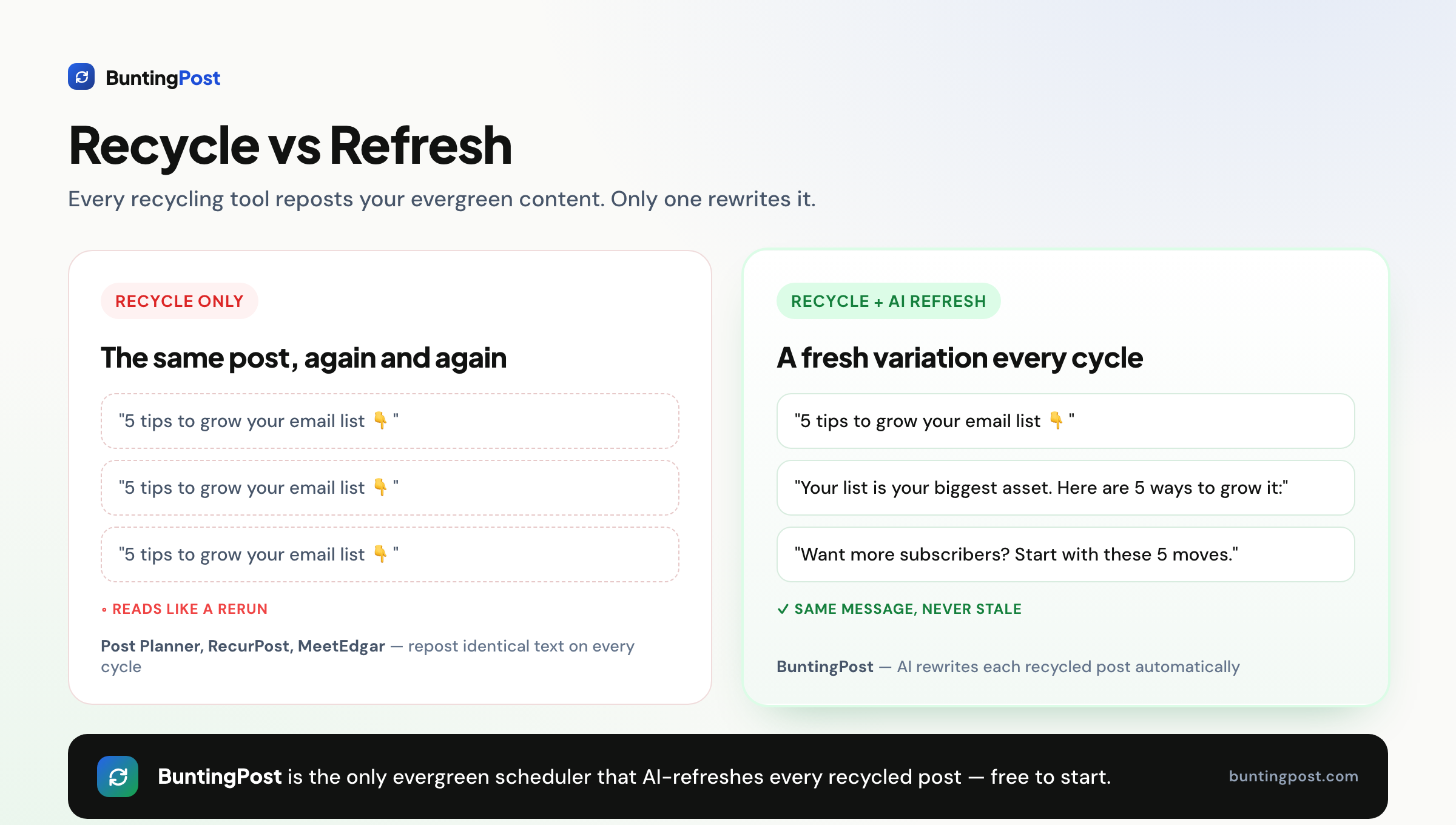
This is the job almost no other scheduler does. Recycling tools keep a library of evergreen posts and republish them on a cycle, so your feed never goes quiet. The universal complaint is that the same words show up again and again. BuntingPost's evergreen engine fixes that by rewriting the post every cycle. New hook, new angle, same core message, never a word-for-word repost.
Every post is held for your approval before it publishes. Nothing goes out unseen.
What to look for in an AI social media scheduler
Six criteria decide this. Check each one against your own workflow, because the tools differ sharply on all of them.
1. Does the AI write from your own sources or from a blank prompt?
Most buyers skip this question. If the AI only writes when you bring it a prompt, you are still the content engine. The stronger model connects to what you already publish, such as case studies and testimonials, blog RSS, a changelog or release notes, meeting notes from your note-taker, an X account, and GitHub, and writes from that. Also ask what happens after the first post: if the tool recycles content, check whether repeats are rewritten or repeated word for word.
2. Is there real content recycling underneath the AI?
AI captions are useless for evergreen content if the tool cannot repeat a post. Buffer and Metricool have no recycling at all. They publish once and the post is gone. For an evergreen strategy you need libraries or categories with recurring time slots. BuntingPost, SocialBee, RecurPost and MeetEdgar all have that.
3. Is there a free plan with both AI and recycling?
Almost none. Buffer's free plan has no recycling. MeetEdgar and SocialBee have no free plan at all. RecurPost's free tier has shrunk to 10 recurring posts. BuntingPost's free plan does not schedule anything: it writes up to 4 posts a month from one connected source, and you publish them by copy-paste. Full autopilot publishing starts at $49 once.
4. One-time, flat, or per-profile pricing?
Per-profile pricing means your bill grows every time you add an account. Buffer charges $5 per channel per month on annual billing, so three channels cost $15 a month. RecurPost starts at $9 a month. BuntingPost charges once: $49 for Starter, $99 for Pro. Work out the three-year total before you decide.
5. Which platforms does it actually support?
Check the network list against where you post. BuntingPost publishes to LinkedIn, both profiles and company pages, and to X. Other channels may follow. Instagram is not supported, and neither is TikTok. If Instagram auto-posting matters to you, pick a tool with genuine native support. Several recycling tools quietly rely on a manual workaround instead.
6. Are analytics and approvals locked to a top tier?
Read the pricing table closely. Features you assume are included often sit on the most expensive plan. RecurPost puts analytics and approval workflows on its Agency tier. Confirm which plan a feature appears on before you buy, so the insights you are paying for are actually reachable.
How we evaluate AI schedulers
AI is the most oversold word in this category, so the first job here is separating what the AI actually does from what the landing page implies:
- AI claims: each tool's AI is classified from its docs: caption generation, rewriting, or scheduling optimisation. We name which it is.
- Pricing: read off vendor pricing pages, with AI features' plan gating noted.
- Features: verified against vendor docs and changelogs, not demo videos.
- Ratings: from G2 and Capterra, opened and verified, with review counts shown. Scores we cannot confirm are left out. Small samples are flagged so you can weigh them lightly.
- Ownership: BuntingPost is our product and is ranked in this guide. The ranking criterion, AI that writes from your own sources and keeps working after the first post, is stated so you can judge the claim yourself.
The best AI social media schedulers in 2026
The tools below are ranked by how far their AI goes. Each entry follows the same template, so you can compare like for like.
1. BuntingPost, best AI scheduler for founders on LinkedIn and X
BuntingPost is the LinkedIn autopilot for founders, used by 129+ founders. You connect sources you already publish, such as your testimonials, case studies, blog RSS, changelog or release notes, meeting notes from your note-taker, X account, and GitHub. The AI writes LinkedIn posts from them in your voice, following plain-English instructions you set once, aimed at the audience you define. After setup it takes about 5 minutes a week. BuntingPost is our product, so read this entry as the maker's pitch.
Every post is held so you can approve, edit or skip it before it publishes. X posts can be repurposed into LinkedIn posts, rewritten for LinkedIn's format rather than cross-posted. The evergreen engine is still here too: BuntingPost is the only tool in this guide that rewrites a recycled post before it repeats, so your best posts go back into rotation fresh, never word for word.
Key features
- AI writes LinkedIn posts from sources you already publish: testimonials, case studies, blog RSS, changelog or release notes, meeting notes, X account, GitHub
- Voice profile plus plain-English standing instructions, so posts sound like you and stay on brief
- A review window on every post, so nothing publishes without your OK
- X-to-LinkedIn repurposing that rewrites posts for LinkedIn's format, never cross-posts
- Evergreen rotation that rewrites your best posts fresh each time they repeat, never word for word
- Multiple audiences and content-mix control on Pro
- Per-post analytics, with AI insights on Pro
Pros
- Solves the content problem: posts are written from what you already publish, not from a blank box
- Nothing publishes unseen; every post waits for your say
- One-time pricing, so the cost does not grow month after month
- Free plan is permanent, not a trial
Cons
- LinkedIn and X only. No Instagram or TikTok support
- The free plan writes 4 posts a month and does not publish them; you copy-paste
- New product, with no third-party review history yet
Pricing: Free forever with 1 connected source and 4 AI-written posts a month, no card needed; you publish free-plan posts by copy-paste. Starter is $49 once for 1 LinkedIn profile on autopilot, 3 sources and 15 posts a month. Pro is $99 once and adds a company page, unlimited sources and 31 posts a month per account. Agency is $199 once for 5 LinkedIn accounts across client workspaces. There are no monthly fees, so three years on Starter costs $49 in total, and paid plans carry a 7-day money-back guarantee.
User reviews: No verified third-party rating yet. For how it compares against tools with free plans, see our best free social media scheduler guide.
Best for: founders and solo brands whose platforms are LinkedIn and X, and who want posting to run itself from content they already have.
2. SocialBee, best AI Copilot for building a content strategy
SocialBee is a category-based recycling tool with the strongest AI generation of the traditional set. Its AI Copilot builds a whole posting plan from a short brief, covering categories, timing and captions. Recycling works by content category, and each category cycles automatically. See our best free social media scheduler comparison for more.
Key features
- AI Copilot that generates posting strategies and captions
- Category-based evergreen recycling
- RSS-to-social content import
- Wide network coverage
Pros
- Strongest AI generation among recycling tools
- Category recycling built in
- Good value for solo users
Cons
- No free plan, only a 14-day trial
- One workspace on the entry tier
- Real learning curve
- The AI writes new posts but does not refresh recycled ones
Pricing: Bootstrap costs $29 a month, which is $1,044 over three years. There is no free plan.
User reviews: 4.7/5 on G2 from 478 reviews, and 4.4/5 on Capterra from 39 reviews. The Capterra sample is small, so weigh it lightly.
Best for: solos who want AI to design a content strategy from a blank slate.
3. Publer, best budget AI tool for caption variations and images

Publer is one of the cheapest capable cloud schedulers. Its AI story has two halves: Spintax variations that rotate wording across a set of captions, and built-in AI image generation. That combination suits budget users who want both caption variety and images in one place. Recycling exists but is a side feature.
Key features
- Spintax variations that rotate caption wording
- Built-in AI image generation
- Bulk scheduling and X thread scheduling
- Canva, Google Drive and Dropbox integrations, plus link-in-bio
Pros
- Among the cheapest capable cloud tools
- Spintax adds variety to repeated posts
- Clean interface and strong integrations
- Fast support
Cons
- Recycling is not the focus of the product
- Recurring posts need a higher plan
- Spintax rotates preset wording rather than rewriting each post
Pricing: Free with 3 accounts and 10 scheduled posts each. Professional starts at $5 a month for 1 account and rises with usage.
User reviews: 4.7/5 on G2 from 521 reviews, and 4.8/5 on Capterra from 957 reviews. That is the strongest score in this guide.
Best for: budget users who want caption variations and AI images in one cheap tool.
4. RecurPost, best budget recycling tool with AI captions

RecurPost is the cheapest tool built specifically around evergreen recycling. It adds AI caption generation on top of recurring time slots. Every plan includes evergreen libraries and recurring slots. It also supports Google Business Profile and white-label reports, which small agencies like. See our RecurPost alternatives guide for a fuller breakdown.
Key features
- Evergreen libraries and recurring time slots on every plan
- AI caption generation
- Google Business Profile support
- Social inbox and white-label reports
Pros
- Cheapest true recycling tool
- Recurring slots on all tiers
- Wide network list
- Free tier still includes recycling
Cons
- Analytics and approvals are locked to the Agency tier
- Instagram needs a workaround, and profiles sometimes disconnect quietly
- The free plan has shrunk over time
- The AI writes captions but does not refresh recycled posts
Pricing: Starter costs $9 a month, which is $324 over three years. A small free tier exists, at 3 profiles, 10 recurring posts and 1 user. BuntingPost Starter is $49 once, so over the same three years it saves $275, or 85%.
User reviews: 4.7/5 on G2 from 65 reviews, and 4.7/5 on Capterra from 170 reviews.
Best for: budget-conscious users and small agencies who want real recycling with Google Business support.
5. MeetEdgar, best hands-off category recycling

MeetEdgar invented category-based recycling and is still a clean set-and-forget option. Its category buckets recycle a large library on their own. Its Inky AI writes captions for posts you add. It is an established brand with a loyal base. The barrier is price, since there is no cheap or free entry point.
Key features
- Category buckets that recycle a large library automatically
- Inky AI caption generation
- RSS import to fill the library
- Built-in A/B testing
Pros
- Clean set-and-forget automation
- Established brand
- Category recycling and RSS auto-fill
- A/B testing built in
Cons
- No free plan and no cheap tier
- Limited control over individual posts
- Fewer networks than rivals
- Inky writes captions but does not refresh recycled posts
Pricing: Eddie costs $29.99 a month, or $24.91 a month on annual billing. There is no free plan.
User reviews: 4.3/5 on G2 from 57 reviews, and 4.6/5 on Capterra from 39 reviews. The Capterra sample is small, so weigh it lightly.
Best for: established brands who want hands-off category recycling and will pay for it.
6. Metricool, best AI writing assistant paired with deep analytics
Metricool pairs an AI writing assistant with the deepest analytics in this guide, including Google, Meta and TikTok ad reporting. It suits teams who care more about measurement than repetition. One caveat matters. Metricool has no content recycling, so it is not an evergreen tool. Its AI writes new posts and stops there.
Key features
- AI writing assistant for new posts
- Deep cross-platform analytics
- Google, Meta and TikTok ad management
- One planning calendar across networks
Pros
- Best analytics and reporting in this guide
- Ad management next to organic scheduling
- Free plan with 1 brand and 50 posts
Cons
- No content recycling at all
- Free plan leaves out LinkedIn and X
- The AI is for new posts only
Pricing: Free with 1 brand and 50 posts, without LinkedIn or X. Starter starts at $20 a month, though the vendor does not make the billing basis clear.
User reviews: 4.5/5 on G2 from 98 reviews, and 4.4/5 on Capterra from 98 reviews.
Best for: data-led teams who put analytics and ad reporting ahead of recycling.
AI ratings and pricing compared
| Tool | User rating (G2 / Capterra) | Cheapest paid tier |
|---|---|---|
| BuntingPost | No verified rating yet | $49 once (Starter) |
| Publer | 4.7/5 from 521 / 4.8/5 from 957 | $5/mo (Professional) |
| RecurPost | 4.7/5 from 65 / 4.7/5 from 170 | $9/mo (Starter) |
| Metricool | 4.5/5 from 98 / 4.4/5 from 98 | from $20/mo (Starter) |
| SocialBee | 4.7/5 from 478 / 4.4/5 from 39 | $29/mo (Bootstrap) |
| MeetEdgar | 4.3/5 from 57 / 4.6/5 from 39 | $24.91/mo annual (Eddie) |
Ratings and prices checked July 2026. Each cell shows the G2 score and review count first, then Capterra. Annual billing is used where a vendor offers it, because that is their lowest published rate. We cite a review platform only when we read the score off its own page.
Rewriting recycled posts vs generating new captions
The difference comes down to when the AI does its work. Generic AI schedulers use AI once, at writing time. You prompt it, it returns a caption, and the caption is then frozen. When that post repeats, the same words appear again. That is why the standard complaint about recycling tools is repetition.
A refreshing scheduler uses AI on every cycle. The same evergreen idea reaches your audience in new words each time.
| Capability | Generic AI scheduler | BuntingPost |
|---|---|---|
| When the AI runs | Once, at writing time | Every cycle |
| Recycled posts | Repeat the same wording | Rewritten fresh each time |
| Reads like a rerun? | Yes, over time | No. New hook and wording each cycle |
| Control over rewrites | None after writing | Every variant held for your approval |
| Sounds like you | Generic output from a prompt | Voice profile built from your published posts |
How to choose an AI scheduler
The choice mostly depends on whether you plan to recycle content and what you want to spend. Work through these questions and follow the branch that matches you.
Do you want to recycle evergreen content, or just publish new posts once?
- Recycle evergreen content: pick a tool with real recycling, such as BuntingPost, SocialBee, RecurPost or MeetEdgar.
- Publish new posts once: a non-recycling tool like Metricool or Buffer is fine.
Do you need recycled posts to stay fresh?
- Yes: BuntingPost is the only tool here that rewrites each repeat.
- No, repetition is fine: SocialBee, RecurPost or MeetEdgar will recycle without rewriting.
Do you need a free plan with both AI and recycling?
- Yes: your options are small. RecurPost's free tier covers 10 recurring posts with no rewriting. BuntingPost's free plan does not schedule at all; it writes up to 4 posts a month from one source, and you publish them by copy-paste.
- No, and I want the highest review score: Publer is a strong budget pick at 4.7/5 on G2 and 4.8/5 on Capterra.
Which platforms do you need?
- LinkedIn or X: BuntingPost publishes to both, including LinkedIn company pages on Pro. Other channels may follow.
- Instagram or TikTok: pick a tool with genuine native support, such as Metricool.
Do you care more about analytics than recycling?
- Yes: Metricool has the deepest analytics, but no recycling.
- No: go back to BuntingPost or SocialBee.
Use-case cheat sheet
Match your situation to a pick.
| Scenario | Best AI tool | Why |
|---|---|---|
| LinkedIn and X posting that runs itself | BuntingPost | AI writes posts from your blog, changelog and X account, in your voice |
| Recycling evergreen content that must stay fresh | BuntingPost | It rewrites each repeat, so posts do not read like reruns |
| Trying the AI writing before paying | BuntingPost | Free plan writes 4 posts a month from one source, no card; you publish by copy-paste |
| Lowest cost over three years | BuntingPost Starter | $49 once, so three years costs $49 |
| Cheapest monthly recycling plan | RecurPost | $9 a month, or $324 over three years |
| Letting AI build a content plan from scratch | SocialBee | AI Copilot generates a full posting strategy |
| Caption variations plus AI images | Publer | Spintax variations and image generation in one cheap tool |
| Highest independent review score | Publer | 4.7/5 on G2 from 521 reviews, 4.8/5 on Capterra from 957 |
| Hands-off category recycling | MeetEdgar | Category buckets recycle on their own, with Inky AI captions |
| Deep analytics and ad reporting | Metricool | Best reporting here, though it has no recycling |
| Simple scheduling with no recycling | Buffer | Simplest interface and a permanent free plan |
| Instagram-first posting | Metricool | BuntingPost does not support Instagram |
Ratings and prices checked July 2026.
How to get started with AI scheduling
This is faster than most people expect. With a source-connected tool like BuntingPost, setup is under an hour, and the routine after that is about 5 minutes a week.
- Connect the sources you already publish: case-study and testimonial pages, blog RSS, changelog or release notes, meeting notes from your note-taker, your X account, and GitHub.
- Describe your audience and standing instructions in plain English, once.
- Let the tool build a voice profile from your published posts, so posts sound like you.
- Let the AI write from those sources, and review each post before it publishes.
- After a few weeks, add the posts that beat your usual engagement to the evergreen rotation, so they rerun rewritten fresh, never word for word.
- Check in weekly. Approving or skipping the queue is the whole job from here.
Frequently asked questions about AI schedulers
What is the best AI social media scheduler?
What is an AI content scheduler?
Can AI schedule social media posts automatically?
Are AI-generated captions any good?
Frequently asked questions about recycling and rewriting
Can AI rewrite or refresh recycled posts?
What is the difference between rewriting and AI captions?
Which AI scheduler is best for recycling evergreen content?
Frequently asked questions about cost and platforms
Do AI social media schedulers have a free plan?
How much does an AI social media scheduler cost?
Which platforms suggest optimal post times using AI?
Does an AI scheduler work for Instagram?
The bottom line
BuntingPost is the best AI social media scheduler in 2026 because its AI starts from your own sources and keeps working after the first post: it writes LinkedIn posts from content you already publish, in your voice, and rewrites evergreen repeats so they stay fresh. That claim comes with a scope: it fits founders whose platforms are LinkedIn and X. Judge it yourself on the free plan, which writes posts you publish by copy-paste. Full autopilot publishing starts at a one-time $49, so three years costs $49.
If you want AI to build a strategy from scratch, SocialBee's Copilot fits. If you want the highest review score on a budget, Publer stands out at 4.7/5 on G2 and 4.8/5 on Capterra. If analytics matter more than recycling, Metricool leads. To compare the free options across the category, see our best free social media scheduler guide. Our RecurPost alternatives breakdown compares the recycling specialists in more depth.
Made it this far? Take the swipe file
30 LinkedIn post prompts for founders, organized by source: your changelog, your customers, your numbers, your opinions. The link is yours immediately, plus the occasional practical guide on LinkedIn for founders.
Optional. No spam, unsubscribe anytime.




