6 Best Postcron Alternatives (Free Plans and a $49-Once Autopilot)
Six Postcron alternatives compared on price, verified ratings, and the features Postcron lacks. One is free; one costs $49 once instead of monthly.
Updated August 4, 2026 · By Aditi Chaturvedi
On this page
The best Postcron alternatives in 2026
The best Postcron alternative in 2026 is BuntingPost, if your platforms are LinkedIn and X. It is the LinkedIn autopilot for founders. It writes posts from content you already publish, and its evergreen engine reruns your best posts with a fresh AI rewrite each cycle, held for your approval.
Postcron is an older bulk scheduler. It has an image editor and CSV upload. It has no evergreen recycling and no AI refresh. It also holds the lowest G2 and Capterra scores in this guide.
One caveat before you read on. BuntingPost publishes to LinkedIn, covering profiles and company pages, and to X. Instagram is not supported, and other channels may follow. If you need Instagram or Facebook right now, pick one of the other tools below.
| Question | Short answer |
|---|---|
| Best overall alternative | BuntingPost, if your platforms are LinkedIn and X. Starter costs $49 once. |
| Cheapest paid recycling | RecurPost Starter at $9/mo. |
| Best free option | Publer or Buffer. Both keep a free plan. |
| How Postcron rates | 4.2/5 on G2 from 41 reviews, and 3.7/5 on Capterra from 79 reviews. The lowest scores here. |
| What Postcron costs | Postcron does not publish a price on its own site. |
Ratings and prices checked July 2026.
Problems with Postcron
Postcron has four main gaps. It was built for bulk uploads, not for evergreen content. Here is what users run into.
- No evergreen recycling. Postcron schedules a post once and then forgets it. There is no library that cycles your best posts on a repeat schedule.
- No AI refresh. Even if you reschedule a post by hand, the text stays the same. Repeat posts read like reruns.
- A dated interface. The tool comes from the bulk-upload era of social software. Users comparing it to newer calendar and queue tools say it feels old.
- Thin analytics. Reporting is basic. It is hard to see which posts worked, so you cannot double down on the winners.
- No published price. Postcron's own pricing page loads no prices. You have to sign up or ask before you know the cost.
The reviews back this up. Postcron rates 4.2/5 on G2 from 41 reviews, and 3.7/5 on Capterra from 79 reviews, the lowest in this guide on both. Billing and refund complaints come up again and again. Read them on G2 and Capterra.
"the site and billing is deceptive. I asked for a refund 5 times." Rob G., Postcron review on Capterra, June 2022
To be fair, Postcron is still running. It is not a dead product. It is just an old one.
How modern tools solve these problems
Modern schedulers fix each of these gaps. Here is how each problem maps to a fix.
- No recycling → evergreen libraries. You group posts into a library. The tool cycles them through repeating time slots for as long as you like.
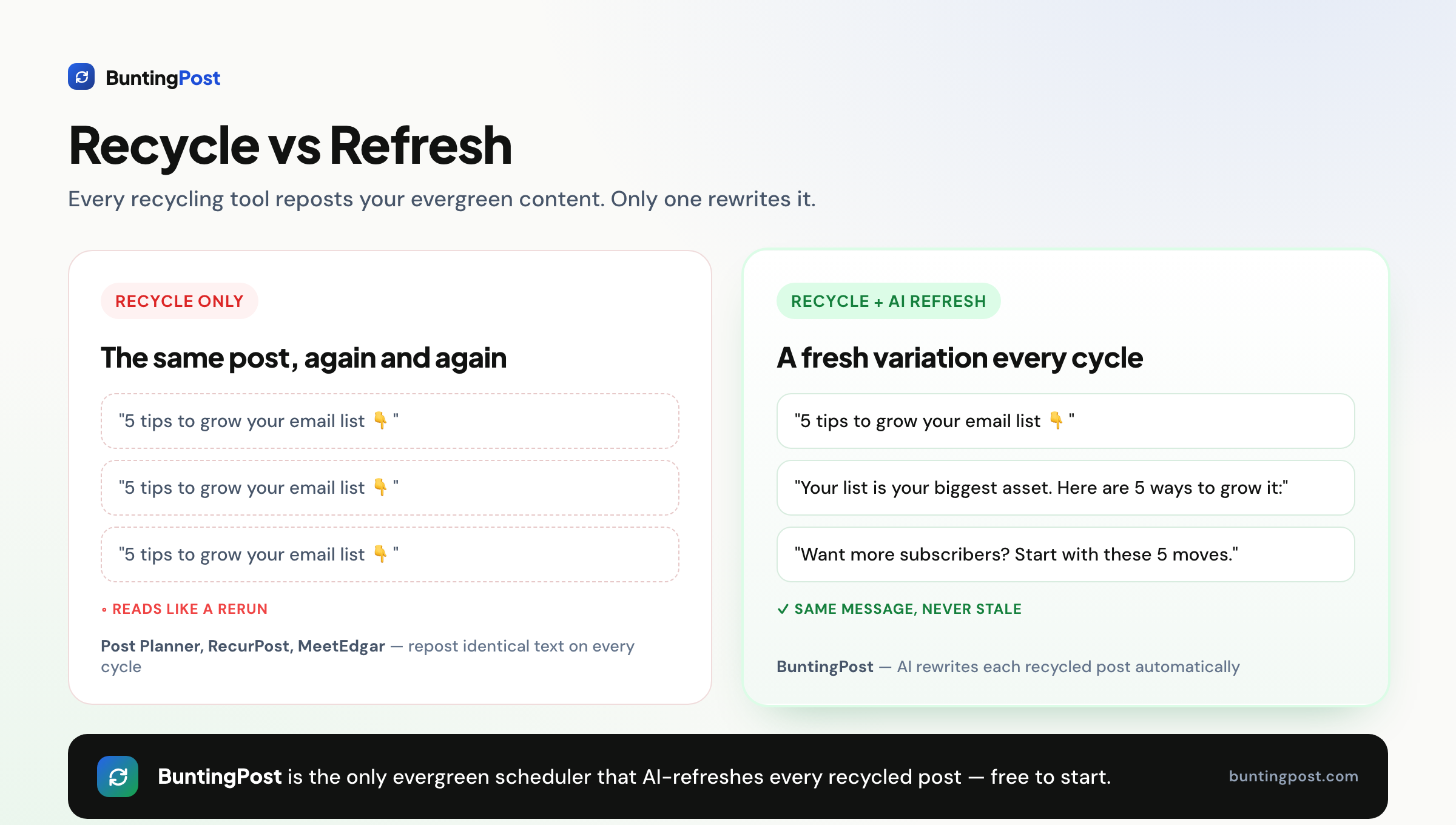
- Stale reruns → AI-rewritten variants. The tool writes a new hook and new wording each time a post recycles. BuntingPost does this on every cycle.
- Dated interface → calendar and queue views. You see what publishes and when, on one screen.
- Thin analytics → per-post reporting. BuntingPost includes per-post analytics on its paid plans, so you know what is worth recycling.
- No published price → clear pricing pages. Publer, Buffer, RecurPost and BuntingPost all publish their prices in public.
What to look for in a Postcron alternative
Seven things separate a modern scheduler from an old bulk tool. Weigh each one against how you actually post.
1. Evergreen recycling
Evergreen recycling means the tool posts your best content again on a schedule you set. This is the biggest upgrade over Postcron. Your best posts keep working without you re-uploading them.
2. Freshness on repeat cycles
Reposting the same words is the top complaint in this category. Look for a tool that changes the wording each time. BuntingPost rewrites with AI. Publer varies text with Spintax.
3. The platforms you actually use
Check every network you post to before you pay. BuntingPost publishes to LinkedIn and X only, and other channels may follow. If you need Instagram or Facebook now, choose Publer, Buffer or Metricool.
4. Pricing that does not climb
Buffer charges per channel. RecurPost charges per tier. Both bills grow as you add accounts. A one-time price or a flat price is easier to plan around.
5. A usable free tier
A free plan lets you test the workflow first. Check whether recycling is included, because most free plans drop it. BuntingPost's free plan writes 4 posts a month from your own content, though you publish those by copy-paste.
6. Analytics you can act on
Look for post-level numbers, not just follower counts. You want to know which posts earned their place in your library. Metricool leads on reporting depth.
7. An easy first week
Moving tools should take an hour, not a weekend. Look for bulk import, or an AI that writes a starting library for you. BuntingPost builds a voice profile from your published posts in one click.
How we evaluate Postcron alternatives
Postcron is an ageing product, so the first check on every alternative is that it is alive and maintained. Then the standard checks:
- Product health: recent releases or changelog activity confirmed before a tool is listed. Dead tools are flagged, not ranked.
- Pricing: from vendor pricing pages with the check date in this post.
- Bulk upload: Postcron's signature feature, verified in each alternative's docs.
- Ratings: from G2 and Capterra, opened and verified, with review counts shown. Scores we cannot confirm are left out.
- Ownership: BuntingPost is our product. It appears in this list with that disclosure, and it is never ranked above a tool that beats it on the criterion at hand.
The 6 best Postcron alternatives in 2026
1. BuntingPost: best for founders on LinkedIn and X
BuntingPost is the LinkedIn autopilot for founders, not a bulk scheduler. You connect sources you already publish, such as your testimonial pages, case studies, blog RSS, changelog or X account, and the AI writes LinkedIn posts from them in your voice, following plain-English instructions you set.
The evergreen engine covers the part Postcron never had. Your best posts go back into rotation, rewritten fresh each cycle, never word for word. Every post is held so you can approve, edit or skip it before it publishes. It is used by 129+ founders. BuntingPost is our product, so read this entry as the maker's pitch.
Key features
- Connected sources: changelog, blog RSS, X account, testimonial pages, case studies, lead magnets
- AI writes in your voice, under plain-English standing instructions, aimed at the audience you define
- Evergreen engine that reruns your best posts, rewritten fresh, never word for word
- A review window on every post, so nothing publishes without your OK
- X-to-LinkedIn repurposing that rewrites posts for LinkedIn's format instead of cross-posting
- Per-post analytics on paid plans
Pros
- Recycled posts are rewritten each cycle, never reposted word for word
- Pay once, not every month
- Free plan with no card needed
- Posts wait for your approval before they go out
Cons
- Publishes to LinkedIn and X only. Instagram is not supported
- The free plan writes posts but does not schedule or publish them. Autopilot publishing starts at $49 once
- New product, so there is no large third-party review record yet
- Team workflows are thin. Client approval links sit on the $199 Agency plan only
Pricing: Free is $0 forever, no card: 1 connected source, 4 AI-written posts a month, and you publish by copy-paste. Starter is $49 once: 1 LinkedIn profile on autopilot, 3 sources, 15 posts a month, X-to-LinkedIn repurposing and per-post analytics. Pro is $99 once and adds a company page, unlimited sources, 31 posts a month per account and AI insights. Agency is $199 once for 5 LinkedIn accounts across client workspaces. Paid plans carry a 7-day money-back guarantee. See BuntingPost pricing for the full list.
User reviews: No verified third-party rating yet.
Best for: founders and solo brands whose platforms are LinkedIn and X, and who want posting to run itself from content they already have.
2. Publer: best cheap all-rounder with a free tier

Publer is the cheapest capable cloud scheduler that still includes recycling. It adds Spintax, so repeat posts can vary their wording. The interface is clean and the integrations are strong. See our guide to the best free social media schedulers for where Publer fits among free tools.
Key features
- Recycling with Spintax text variations
- Bulk scheduling and X thread scheduling
- AI image generation, plus Canva, Drive and Dropbox links
- Link-in-bio page
Pros
- One of the cheapest capable cloud tools
- Spintax adds some freshness to repeat posts
- Wide platform coverage, including Instagram
- Fast support
Cons
- Recycling is a side feature, not the main job
- The interface takes some getting used to
- Recurring posts need a higher plan
- Spintax swaps words. It does not rewrite the post
Pricing: Professional starts at $5/mo for 1 account and rises with usage. There is a free tier.
User reviews: 4.7/5 on G2 from 521 reviews, and 4.8/5 on Capterra from 957 reviews, among the highest in this category.
Best for: cost-conscious users who want a clean all-rounder with light recycling.
3. Buffer: best for the simplest scheduling

Buffer is the simplest cross-platform scheduler on this list. It keeps a free plan and it is reliable. Be clear about one thing first: Buffer has no content recycling at all. Read our free Buffer alternative guide for the full comparison.
Key features
- Simple cross-platform scheduling
- Light AI assistant for captions
- Community inbox on paid tiers
- Free plan
Pros
- The simplest interface in this guide
- Free plan that does not expire
- Well established and dependable
Cons
- No content recycling at all
- Thin analytics
- Per-channel pricing adds up fast
Pricing: Essentials is $5/mo per channel on annual billing. There is a free plan.
User reviews: 4.3/5 on G2 from 1,039 reviews, and 4.5/5 on Capterra from 1,492 reviews.
Best for: people who want the simplest queue and do not need recycling.
4. RecurPost: best cheap true recycling

RecurPost puts evergreen libraries and repeating time slots on every plan. That makes it the cheapest true recycling tool here. It also supports Google Business Profile, which most rivals skip. See our RecurPost alternatives guide for a closer look.
Key features
- Evergreen libraries and repeating time slots on every plan
- Google Business Profile support
- AI captions and Instagram DM automation
- Social inbox and white-label reports
Pros
- Cheapest paid tool with real recycling
- Repeating slots on all tiers
- Google Business Profile support
- Wide platform list
Cons
- Analytics and approvals sit on the top tier only
- Instagram needs a workaround
- Profiles sometimes disconnect without warning
- Recycled posts repeat the same text
Pricing: Starter is $9/mo. There is a limited free tier.
User reviews: 4.7/5 on G2 from 65 reviews, and 4.7/5 on Capterra from 170 reviews.
Best for: budget users who want recycling on every tier and Google Business Profile posting.
5. SocialBee: best for AI-assisted category recycling

SocialBee sorts your posts into categories and recycles each category on a schedule. Its AI Copilot can write a whole posting strategy for you. It suits Postcron users who want AI help building a content plan.
Key features
- Category-based evergreen recycling
- AI Copilot that generates full content strategies
- RSS feeds that fill your categories automatically
Pros
- Strong AI planning tools
- Category recycling built in from the start
- Good feature set for the price
Cons
- No free plan
- Entry tier covers only 1 workspace
- Sections of the interface look alike, so there is a learning curve
- Support can be slow outside EU hours
Pricing: Bootstrap is $29/mo. There is no free plan.
User reviews: 4.7/5 on G2 from 478 reviews, and 4.4/5 on Capterra from 39 reviews.
Best for: solo marketers who want AI to build and sort their content plan.
6. Metricool: best for analytics and ads
Metricool is a scheduler built around reporting. It handles Google, Meta and TikTok ads alongside your organic posts. It has a free plan, but no recycling at all.
Key features
- Scheduling with deep analytics and reports
- Google, Meta and TikTok ads management
- Free plan for a single brand
Pros
- The best analytics in this guide
- Ads and organic posts in one place
- Free plan available
Cons
- No content recycling
- The free plan is tightly capped
- Reporting depth means more setup up front
Pricing: Starter is from $20/mo. There is a free plan.
User reviews: 4.5/5 on G2 from 98 reviews, and 4.4/5 on Capterra from 98 reviews.
Best for: marketers who care most about reporting and ads.
Postcron vs BuntingPost, side by side
BuntingPost adds the two things Postcron never had: evergreen recycling and AI-rewritten reposts. It also publishes its price.
| Feature | BuntingPost | Postcron |
|---|---|---|
| Evergreen recycling | Yes | No |
| AI-rewritten reposts | Yes, a fresh version each cycle | No |
| Free plan | Yes, writes 4 posts a month, published by copy-paste | Not clearly published |
| Entry price | $49 once (Starter) | Not published on the vendor site |
| Pricing model | One-time payment | Subscription tiers |
| Review before publish | Held for your approval | You write it yourself |
| Platforms live today | LinkedIn, covering profiles and company pages, and X | Broad, established |
| User rating | No verified rating yet | G2 4.2/5 from 41 reviews. Capterra 3.7/5 from 79 reviews |
Ratings and prices checked July 2026.
What the switch costs over three years
BuntingPost Starter is $49 once. Over three years that is $49 in total. Here is how the tools you can price up compare over the same period.
| Tool | Entry price | Saving vs BuntingPost |
|---|---|---|
| BuntingPost Starter | $49 once | Baseline |
| Buffer Essentials | $5/mo per channel | Save $131 (73%) |
| RecurPost Starter | $9/mo | Save $275 (85%) |
| Metricool Starter | $20/mo | Save $671 (93%) |
| SocialBee Bootstrap | $29/mo | Save $995 (95%) |
Postcron is missing from that table on purpose. Its own pricing page loads no prices, so we cannot state one. Capterra lists a Personal plan at $9/mo. If that figure holds, three years of Postcron costs about $324 and BuntingPost Starter saves you around $275, or 85%. Treat that as an estimate, not a quote.
How to choose the right Postcron alternative
Three questions narrow the field to one tool.
Do you want your best posts to keep running by themselves?
- Yes, and I want each repost to read fresh → BuntingPost.
- Yes, on the smallest budget → RecurPost, or Publer with Spintax.
- No, I just want a simple queue → Buffer.
How do you want to pay?
- Nothing at all → Publer, Buffer or Metricool free plans. BuntingPost Free writes posts, but you publish them by copy-paste.
- Once, and never again → BuntingPost Starter at $49.
- Monthly, for the widest feature set → SocialBee at $29/mo.
What matters most beyond scheduling?
- Posts that never read like reruns → BuntingPost.
- Analytics and ads → Metricool.
- Google Business Profile and client reports → RecurPost.
- Instagram publishing today → Publer, Buffer or Metricool.
Use-case cheat sheet
| Scenario | Best pick | Why |
|---|---|---|
| You want recycling and hate paying monthly | BuntingPost | Starter is $49 once, and the evergreen engine keeps your best posts in rotation |
| Your feed must never read like a rerun | BuntingPost | AI rewrites every recycled post |
| You want the cheapest paid recycling | RecurPost | Starter is $9/mo with slots on all tiers |
| You want to test the AI writing free | BuntingPost | Free writes 4 posts a month from one source, published by copy-paste |
| You post to Instagram every day | Publer | Instagram is live and the entry price is $5/mo |
| You want the simplest possible queue | Buffer | The easiest interface, with a free plan |
| You want AI to plan your whole month | SocialBee | The AI Copilot writes a full strategy |
| You live in your reports | Metricool | The deepest analytics here, plus ads |
| You run a local business on Google | RecurPost | Google Business Profile posting on every plan |
| You need client-ready reports | RecurPost | White-label reports on the top tier |
| You want approval before anything publishes | BuntingPost | Every post waits for your OK |
Frequently asked questions about Postcron alternatives
What is the best Postcron alternative?
Is there a free Postcron alternative?
Is Postcron still worth using in 2026?
Frequently asked questions about pricing
How much does Postcron cost?
How much does BuntingPost cost compared to Postcron?
Which Postcron alternative is cheapest over three years?
Frequently asked questions about switching
Which alternatives have evergreen recycling?
Can I move my Postcron content to a new tool?
Do I have to give up Instagram if I switch?
The bottom line
If your platforms are LinkedIn and X, BuntingPost is the best pick for leaving Postcron. It is the LinkedIn autopilot for founders: it writes posts from content you already publish, and it rewrites each recycled post so your feed never repeats itself. Starter costs $49 once, and the free plan writes posts so you can judge the writing first. See BuntingPost pricing for the plans. If you want the cheapest monthly recycling, look at RecurPost. If you want the simplest free queue, use Buffer.
Disclosure: BuntingPost is our product. Where it appears in the comparisons and recommendations above, read it with that in mind. Prices, limits, and ratings for every tool, ours included, are checked against the sources named on this page. Read how we review.
Made it this far? Take the swipe file
30 LinkedIn post prompts for founders, organized by source: your changelog, your customers, your numbers, your opinions. The link is yours immediately, plus the occasional practical guide on LinkedIn for founders.
Optional. No spam, unsubscribe anytime.




